
What you cannot say with words, you can say with a picture. And, this is rightly said – a picture is worth a thousand words. On a web page, you do not have enough space for thousands of words. And, visitors also do not have enough time to read thousands of words. So, in the … Continue reading “How to Use Images Effectively In a Website Design”
Where to Place the Social Media Buttons On the Websites?
First published: Jul 05, 2016
Last modified: May 11, 2020
You are not alone if you are unable to find the best place to add social media buttons to your website. There are some people who argue that these buttons should be avoided as according to them, these buttons have some unfavorable effects on the performance of the website. However, your website reflects the personality of your business on the internet and the social media is a great platform that every brand is using to reach the maximum of its potential audience. By connecting your brand’s personally with the greatest social media platform, you can reap the maximum rewards of the online marketing.
It enables the audience to share your website content or blog on Facebook, Twitter, Instagram, Pinterest, LinkedIn and other social media networking websites.
Why is it so important?
Some of the surveys conducted to analyze online marketing and shopping trends reveal that more than 78% of the online purchasers make their purchasing decision after reading the content published on social media networking websites. The debate of add or not is triggered when a website is not getting a fair amount of shares and traffic from the website to the social media profile. However, remember, its 78%. Social media buttons should be there on the website.
What are the popular options available for the placement of social media buttons?
Here are the 5 most popular options:
- At the top of the content
This is the most commonly used placement option. If the title gives the clear idea of the content, the user can share it even without reading as the button is available right at the top.
- To the left of the content
Users read the content from left to right, placing it on the right side of the content is also a popular option.
- To the right of the content
Adding these buttons to the right side of the content hardly makes any sense. However, still, some websites are out there using this placement. It is difficult to figure out why they opted for this placement.
- To the bottom of the content
Don’t know if they are missing some shares. Some websites and blogs have these buttons just below the content.
- In-line of the post
Now this is a new trend. Some websites have shareable content inline.
Now, the question is, where to place. If the freelance website developer you have hired has analyzed your audience, he probably knows the right place to add social media buttons.
01 Mar 2016
08 Mar 2016
A few years ago, a website was counted as a less necessary cost for a Business. Why a Business needs a website? How and how much it is beneficial for a Business? Brands of all sizes after understanding the importance of having a business website, have deployed their own websites and are also investing money … Continue reading “Hire a Freelance Web Developer in Singapore”
30 Jun 2016
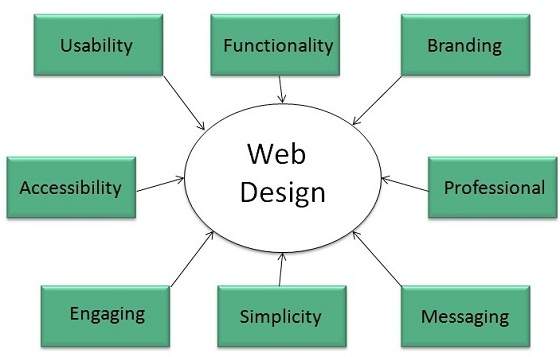
A user visits a websites to get some sort of information and the information has the power of influencing the purchasing decisions. The visual appeal of a website has an influence on what that particular user is going to buy. There are numerous stats, facts and figures demonstrating the effect of look and feel of … Continue reading “6 Essential Components of a Visually Appealing Website Design”
About Me

I’m Subraa, web designer, logo designer, Digital Marketer based in Singapore
- Search Post:
-
Recent Posts
- Why Your Business Needs a Website (Even If You’re Already on Instagram and WhatsApp) 23 September 2026
- Website Design Package Singapore – Features, Inclusions & Options 1 October 2025
- Brochure Sizes and Dimensions: A Complete Guide for Your Business in Singapore 26 September 2025
- Kickstart your business in the New Year with a brand new website! 2 January 2026
- Black Friday Website Deal You Can’t Miss! 4 December 2025
- Tags
- brochure design
- business card
- business card design
- business logo design
- business name card design
- clinic logo design
- company logo design
- company name card design
- consultancy logo design
- Corporate Brochure Design
- crm logo design
- design a flyer
- f&b logo design
- flyer design
- flyer design singapore
- flyers
- flyers design
- food logo
- food logo design
- freelance logo designer
- freelance logo designer singapore
- freelance singapore
- freelance web designer
- freelance web designer in singapore
- freelance web designer singapore
- freelance web developer
- freelance website designer
- lifestyle logo design
- logo design
- logo designer
- logo designers
- logo design in singapore
- logo design singapore
- medical logo design
- name card
- name card design
- product flyer design
- professional logo design
- property flyer design
- real estate flyer design
- restaurant logo design
- singapore
- subraa
- web design
- web design singapore